

Nebraska Secretary of State business search is the free lookup that runs on the corporate search page, and it is the first screen most readers meet when they need a company record. The same office accepts filings through a separate online service, so a search and a filing share an agency but not a login. A visitor can look up a company without an account.
This page follows the state side of the lookup: the search screen, the filters that narrow a short list, the blocks inside an entity page, the online filing route, the reports the office expects, and the papers it issues. It is written for a reader who is already on the site and wants to know which control does what.
How the Nebraska Business Search Works
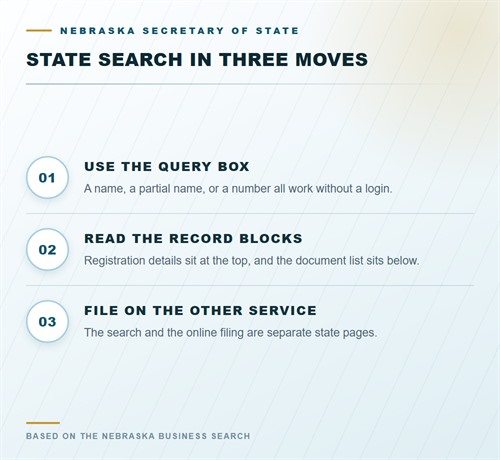
The corporate search page offers a name field and an entity number field. A visitor types a business name or a number and receives a list of matches, and no profile is required for that move. The page is served by the state, not by a directory, so the result is the office record. A second service handles filings and document delivery. A reader who wants to file opens that service rather than the search page. The whole index is described from Nebraska Secretary of State business search on the front page.
The Search Screen
The screen is plain by design: one box for the business name, one for the entity number, and a button. A partial name returns a longer list, and a precise phrase returns a shorter one. Punctuation matters at the margin because the index stores the name as filed. A query that returns nothing is not proof that the company never registered. Try the distinctive word alone, try an earlier name, and try the registered agent, because the agent field is searchable as well.
What a Result Row Carries
Each row lists the entity name, the number, the type, the city, and the standing. The row is a summary rather than the record, so open the entry before drawing a conclusion. A closed company with a familiar name can sit directly above a live one.
Search and Filing Are Separate
The search page does not accept a filing, and the filing service does not replace the search. A reader who needs to check a company and then file a report uses both, in that order. The office keeps the fee schedule on its own page, apart from both.
Nebraska online filing:
https://www.nebraska.gov/apps-sos-edocs/
Filters and Search Routes
The result list can be sorted and narrowed by type or by standing. A broad word such as a city name can return hundreds of rows, and the filter is what makes the list usable. The controls work on the current register rather than on a downloaded copy. Sorting changes the order of the rows without removing any, while a filter removes rows that fail the test. Set the filter first, then sort what remains, because a sorted list of closed companies is still a list of closed companies.
Filtering by Type
The type filter separates a limited liability company from a business corporation, a nonprofit, a partnership, and a trade name. A reader who is checking a supplier usually knows the class from the contract, and the filter removes the near matches.
Filtering by Standing
An active-only view hides dissolved companies that share a word with the one being checked. A reader who is researching a name, rather than a business, should leave the filter open, because a closed record still shows that the word was used before.
Inside an Entity Record
Opening a row loads a page with the registration details at the top and the document list below. Each block answers a separate question. A reader who reads the blocks in order avoids quoting an old address as the current one. The page also carries the office’s own notes, such as a delinquent mark or a reinstatement date. Those notes are what a certificate repeats, so read them before ordering paper.
Registration Details
The top block gives the legal name, the entity number, the type, the formation date, the standing, the principal address, and the registered agent with a Nebraska street address. A mailing address may appear beside the principal one. Copy the fields exactly, because a contract that misspells the legal name creates an argument later. A reader who needs the agent rules behind the address can follow the Nebraska registered agent page.
The Document List
The list shows the papers the office has accepted, with a type and a date for each. Recent items can often be viewed or ordered, while an older paper needs a request. The list tells a reader what exists before a single copy is bought.
Filing Through the State Service
A filing begins on the online service, where the reader uploads a signed form or completes a web form. The service confirms the submission and returns a receipt. The receipt is the proof that the paper arrived, and it belongs with the company records. A rejected paper comes back with a reason rather than a refund. The usual reasons are a missing signature, a name that fails the comparison, or an address outside the state.
Forms and Fees
The office publishes a form for each filing, and the fee schedule sits on a separate page. A reader should open the form for the exact class, because a corporate amendment and an LLC amendment are separate documents. The online amount is usually lower than the in-office amount.
Reports and Deadlines
The report calendar is not the same for every class. An LLC and a nonprofit report in odd years by April 1, while a corporation files in even years by March 1. A missed report can end the registration.
Certificates and Verification
The office issues a certificate with a seal for a small charge, and the paper states the standing on the day of issue. A bank or a registry that receives a copy can check it against the office record. The certificate confirms the paper, not the business. A verified certificate from last year still describes last year, and a reader who needs the current standing has to run a fresh search.
What the Certificate States
The sheet gives the entity name, its number, the type, and the condition on the day it was printed. Owners, revenue, and licences are outside its scope, and it makes no promise about tomorrow.
What the Record Cannot Answer
The file says nothing about a licence, a tax balance, or a lawsuit. Those facts sit with the agency that keeps them, and each agency runs its own lookup. A reader who needs them asks the office rather than reading the entity page twice.
Fees for State Services
Nothing is charged for the search. The table lists the state amounts a filer or a buyer is most likely to need, and the online column is lower on several rows.
| State item | In office | Online |
|---|---|---|
| Application for reserved name | $30 | $30 |
| Certificate of organization, LLC | $110 | $100 |
| Articles of incorporation, nonprofit | $30 | $25 |
| Change of registered agent or office | $30 | $25 |
| Certificate with a seal | $10 | $10 |
| Copies, per page | $1 | $1 |
| Articles of incorporation, corporation | $110 | $100 |
| Business search | $0 | $0 |
Frequently Asked Questions
Each question below comes from a reader using the state service rather than reading a summary of it.
Do I need an account to search?
No. The search page works for a visitor with no profile, and it shows the same record a signed-in user sees. An account is needed only for the filing service, where a receipt and a saved application are kept.
Why does my exact name return nothing?
The index stores the name as it was filed, so punctuation and spacing can differ from the sign. Try the distinctive word alone, then add the ending. A name that still returns nothing may be filed under an earlier title, which the agent search can reveal.
Can I file and search in one place?
The search and the filing are separate services on the state site. A reader uses the search to check a record and the filing service to send a paper. The two do not share a login, and the fee schedule sits on a third page.
How long does an online filing take?
The service confirms the submission at once, and the office reviews the paper on its own schedule. A mailed document adds travel time at each end. A closing date should allow for both stages rather than the confirmation alone.
What does a certificate with a seal prove?
It proves that the office issued the paper and states the standing on its issue date. It does not refresh the standing, and it does not cover a licence or a tax account. A reader who needs today’s condition runs a fresh search.
Where is the entity number?
It sits in the result row and at the top of the record, and it is printed on every certificate. Copy it from the state page rather than a directory, because a third-party listing can carry an old figure or a wrong digit.